On this page
Introduction to This Guide
Valorant offers numerous cosmetic items, including weapon skins, to spice up the game. However, there may be instances where players feel unsatisfied with their purchases, have buyer's remorse, or want to buy a Valorant account instead.
In such cases, Valorant provides the option to refund Valorant skins under certain circumstances, but players must be aware of certain limitations and protocols.
This guide will walk you through refunding Valorant skins, the restrictions, and the protocols you need to know!
Limitations on Refundable Content
Before diving into the refund process, it's vital to understand what can and cannot be refunded in Valorant.
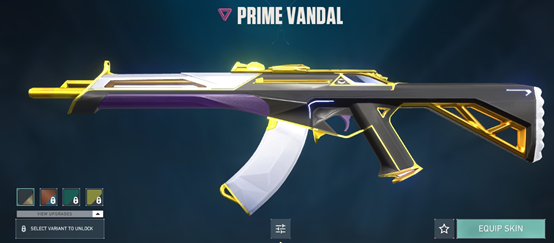
According to the game, only unused content is eligible for a refund. So that means if you have already played with or upgraded the item, it is considered used content and cannot be refunded.
You might also like
Here's a list of items that can be refunded in Valorant, provided they are unused:
- Weapon Skins
- Valorant Points
On the other hand, the following items are non-refundable:
- Weapon Skin Levels and Variants
- Premium Battle Pass
- Premium Battle Pass Chapters
- Character Contract Levels
- Sent Gifts (unless the gift is unclaimed for 60 days, in which case it is refunded)
- Skin Bundles
- Radianite Points
- Agents
- Purchases made with Kingdom Credits (Agent Gear, Accessories Store)
- Used In-Game Content (Player Cards, Gun Buddies, etc.)
It's important to note that while this list is based on the game's policy, some players may successfully refund items that are typically considered non-refundable. Therefore, it's always a good idea to check what can and cannot be refunded in your specific account.
Time Frame for Refundable Content
Another crucial factor is the time frame within which content is eligible for a refund.
Valorant skins and other refundable items must be purchased within the last 14 days to qualify for a refund. Unfortunately, if the purchase was made over two weeks ago, it is no longer eligible for a refund.
Moreover, only base-level skins purchased within the 14-day window can be refunded. The item becomes non-refundable if you have upgraded your skin using Radianite Points, such as by adding a Finisher or VFX.
Steps to Refund Valorant Skins
To initiate the refund process for Valorant skins, follow these steps:
- Visit the Riot Support website and log in with your Riot account.
- Open the skin refund page on Riot Support and log in to view your purchases that are eligible for refunds.
- Find the eligible skin in your list of recent purchases.
- Click "Refund" next to the skin to request your refund.
- If the refund button isn't working, or you want to refund unused VP, submit a ticket to Player Support instead with the details of your purchase.
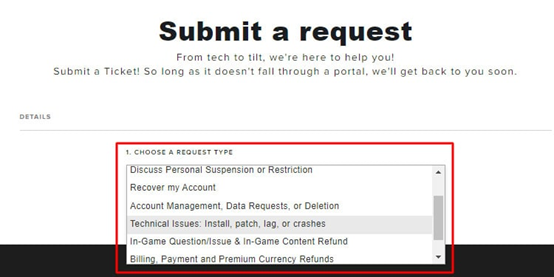
If you submit a ticket, Valorant's support team will review your case and determine whether you are eligible for a refund. The review process typically takes a few business days, so patience is vital while awaiting a response.
Extra Protocols for the Refunding Process
Valorant has created additional rules and protocols regarding the refund process outlined in their refund policy. Here are some key points to keep in mind:
- Valorant can only issue refunds if the payment method used to purchase the content or currency supports refunds. For example, refunds can be processed for payments via PayPal or credit/debit cards but not for prepaid or gift cards.
- If the payment method does not allow refunds, Valorant may offer a refund in the form of in-game currency.
- Refunds for real money will be issued using the same payment method used to purchase points. For example, if you used a credit card to make the purchase, the refund will be credited back to that credit card.
- Purchases made through third-party platforms may have separate refund rules and procedures.
- Having a pending gift (one that has been sent but not yet claimed) blocks all refunds until the recipient claims it.
Time Frame for the Refund Process
The refund process typically takes 2-3 business days, depending on the support team's response time. While it may be a waiting game, ensuring a proper refund is necessary.